MapBrief™

Geography · Economics · Visualization

Paralysis of Choice: Why Map Portals Don’t Work, Part II

“Why Map Portals Don’t Work” is a five-part exploration of why the dominant visual grammar of GIS interfaces serves its public audience so poorly and continues to diverge from the best practices found most everywhere else on the web. Read Part I, Part III, Part IV, Part V.  On February 27th, I will be joining James Fee for an online conversation about this series at SpatiallyAdjusted.com.

Who doesn’t like choice?

What consumer doesn’t want 11 flavors of Special K, the 200 tasty dishes the Cheesecake Factory serves up, or the all-you-can-eat bliss of Golden Corral?

No one.  Or at least no one I care to associate with.

Turns out there are some folks with PhDs (probably don’t go to Golden Corral) who have discovered that too many choices are psychologically debilitating and make people less happy (cue the TED talk).

So yeah, your map portal has too many layers, leaving your users psychologically debilitated and unhappy.

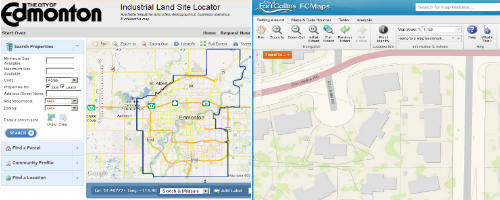
Like most of the usability problems of map portals, this default reflex can be traced to the web 1.0 legacy idea of GIS-in-a-browser where the ideal was importing as much of the visual grammar of desktop GIS interfaces as a browser could support.  Which worked fine…for those who worked with GIS interfaces on a daily basis.

Central to the GIS experience is the ability to determine relationships between different types of features–loaded in as “layers”–and being able to, say, calculate the number of properties within a flood plain. The more layers one has on hand, the more possibilities for exploring multivariate relationships, etc.

Turns out the general user doesn’t have a whole lot of use for exploring multivariate relationships. No, they are searching for a particular piece of information–their tax assessment (and their neighbor’s), the nearest rec center’s hours, a property’s zoning status, etc.

Problem: Multiple map layers make it difficult to elicit a user’s intent and vastly overestimate the public’s interest in figuring out how to manipulate the map display.

That’s why the City of Denver has found single-topic maps get more than 3x the usage of their portal.  And Pareto’s principle is very much in force:  80% of your users are interested in a small handful of use cases. So build your simple single-topic maps to address the most common use cases:  property lookup, parks, crime, polling places, et al.

But what of the 20% who do want to interact more deeply with more data?

If your organization is of the Open Data persuasion (and it should be), then you have it easy.  Because in 2013, engaged general users who are comfortable with map interfaces have Google Earth already downloaded.  Provide a simple KML link and send them on their way.

Now we’re down to the 3-5% of hardcore users who need shapefiles–let ‘em have shapefiles so they can happily go GIS-ing in ArcMap, QGIS, gvSIG, et al.

But let’s be clear: slapping all of your layers on a single interface to placate the most demanding 3-5% of your audience sabotages the user experience of the vast majority.

Or Build Your Own, Better Basemap

We are in the dawn of a New Golden Age of Cartography.  One of its hallmarks is that now we can create our own basemaps, or exert fine-grained control over 3rd party map tiles.  A great example of this fresh approach is the National Park Service’s “Park Tiles” project which manages to integrate 13 layers of information into a clean, intelligent basemap.

Cures for Layerrhea:  a) break out most important layers into single-topic maps; b) provide data downloads for power-users; c) roll your own basemap with supporting, contextual layers baked-in.


—Brian Timoney

**Image above courtesy of the BLM

Coming Soon: Stop ‘Gathering Requirements’


Why Map Portals Don’t Work – Part I

“Why Map Portals Don’t Work” is a five-part exploration of why the dominant visual grammar of GIS interfaces serves its public audience so poorly and continues to diverge from the best practices found most everywhere else on the web. Read Part II, Part III, Part IV, Part V.  On February 27th, I will be joining James Fee for an online conversation about this series at SpatiallyAdjusted.com.

It’s been six months since my most popular post How the Public Actually Uses Local Government Web Maps: Metrics from Denver; I’ve been gratified by the feedback.  But despite laying out detailed metrics showing that single-topic maps garner 3x the traffic of traditional portals, that user-friendly text search is critical to the map experience, and that users don’t spend time fiddling with default viewer parameters, I’ve found two particular reactions troubling:

  • No one has widely circulated their own web metrics that shine a more positive light on map portals.
  • People still keep building public-facing map portals. And writing press releases about them.

            The road to mediocre web experiences is paved with good intentions


For the next few posts, then,  we’ll lay out some major drawbacks of standard web portals as well as suggest a few alternatives along the way.  While the baseline scenario I have in mind are public-facing government mapping portals, those rolling corporate intranet solutions would do well to take heed.

Problem #1: Map Portals Over-Focus on the Map, Under-focus on Text-Based Search and Discovery

The dominant finding from Denver’s metrics is that the public approaches maps to retrieve particular bits of information, and then leave.  And how does everyone do Search & Discovery?  Think of your favorite search engine: you start typing into an auto-suggest box, then you get a text list of possibilities.  Both Google Maps and Bing Maps use a similar visual grammar–search text-box across the top, listings on the left, map on the right.

            Users are familiar with a map that contextualizes text-based search


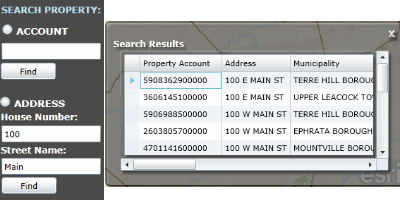
GIS people all-too-easily lose sight how unfamiliar map navigation is for the general user, especially when confronted with an “immersive” experience.  The text box, then, featured prominently and with auto-complete, is a life-raft of familiarity.  Contrast that to this typical setup that we find in the Lancaster County GIS Property Search site:

          Ye shall be known by your Property Account number


The search box is on the left side of the map, with Account search separate from Address search.  OK, what’s an Account number? Address is familiar, but why is House Number separate from Street Name?  Because, as we can all guess, that’s how it’s stored in the database.  And none of this is auto-complete, so my address-lookup is really an address-guess.  Being a clever sort, I enter “100” “Main” and get 15 possibilities popping up in a Results window on the other side of the map. And only two fields are clearly visible, the Property Account and the Address (which I already entered).  Now this business with the Account number being featured so prominently is starting to make me wonder if this site is really meant for the public or the clerks in the Assessor’s Office who work with Account numbers all day long.  Finally, instead of plotting the properties in the map as obvious, clickable placemarks, they’re rendered as polygons, which, at the zoom level necessary to encompass all 15 possibilities, makes them barely visible.  Which I figured out when I went to remove a smudge from my monitor.

We’re not pointing fingers at Lancaster County here, because these are the same choices GIS people inflict on the public every day: unfamiliar interface layouts, text fields that don’t auto-complete, and results windows that pop up in other parts of the screen.

Takeaway #1: Users Want and Need a Large, Obvious, Auto-Complete Text Box to Drive Search & Discovery


Coming Soon: All Those Layers are Getting in the User’s Way


—Brian Timoney

Nate Silver Does Spatial Analysis and So Should You

Who’s up for another Nate Silver post?

You know, the guy who single-handedly save America from the pox of Triumphalist Innumeracy. As both a post-Election victory lap as well as promotion tour for his new book The Signal and the Noise, Silver gave a number of interviews that I enjoyed including the one below at Google.

YouTube Preview Image

At the 48:10 mark he mentions a project on rating New York neighborhoods, and observes in passing that the per-sqaure-foot cost variation in apartment prices can largely be explained by distance to midtown Manhattan, proximity of (quality) schools, and proximity to parks.  According to Silver using just these three variables yielded a r-squared value of 0.93 i.e. 93% of the variation in per-square-foot cost can be explained by the variation in these three variables (a very robust result, by the way).  Those of us who work in the geospatial realm typically have a nodding familiarity with distance weighting, hotspot analysis, spatial autocorrelation, etc.  But using spatially-derived measures in more standard statistical techniques such as multiple regression strike me as a more likely analytic scenario in the day-to-day “data science” work that we’re all promised is the future.

Nate Silver used spatial measures to determine Park Slope is the most desirable neighborhood in New York


Your “Data Science” is Worth Little Without Clearly Communicated Reasoning

A couple of weeks ago Marc Andressen made headlines by stating that English majors and other humanities types were sentencing themselves to professional futures in shoe stores.  As an all-too-typical prejudice of the engineer-centric tech scene, it summarily ignores a piece of the Nate Silver phenomenon every bit as important as his statistical modelling savvy:  his writing ability.  What set Silver apart was that he was explaining his quantitative reasoning clearly, discussing possible weaknesses of his model, and addressing criticisms of his work all on a daily basis.  As a prominent financial blogger noted, the combination of a robust, well-reasoned model combined with a narrative fluency is the true sweet spot.  So by all means, sign up for a Data Analysis course and get your feet wet with R, but keep your Chekhov and Munro within easy reach as well. The world is already plenty full of ineffectual factotums bearing scatter-plots getting steamrolled by those comfortably reliant on their lifetime of hunches.


It’s Not About the Size of your Hadoop Cluster

 
Yes, this.


—Brian Timoney


* Park Slope photo courtesy of  WallyG’s Flickr stream